
Integrations
Connect BabyLoveGrowth to your website platform and automatically publish articles.
BabyLoveGrowth connects to popular website platforms and CMSs so your AI-generated articles publish automatically — no copy-pasting required. Pick your platform below, or open Settings → Integrations in your dashboard to get started.
Finding your integration
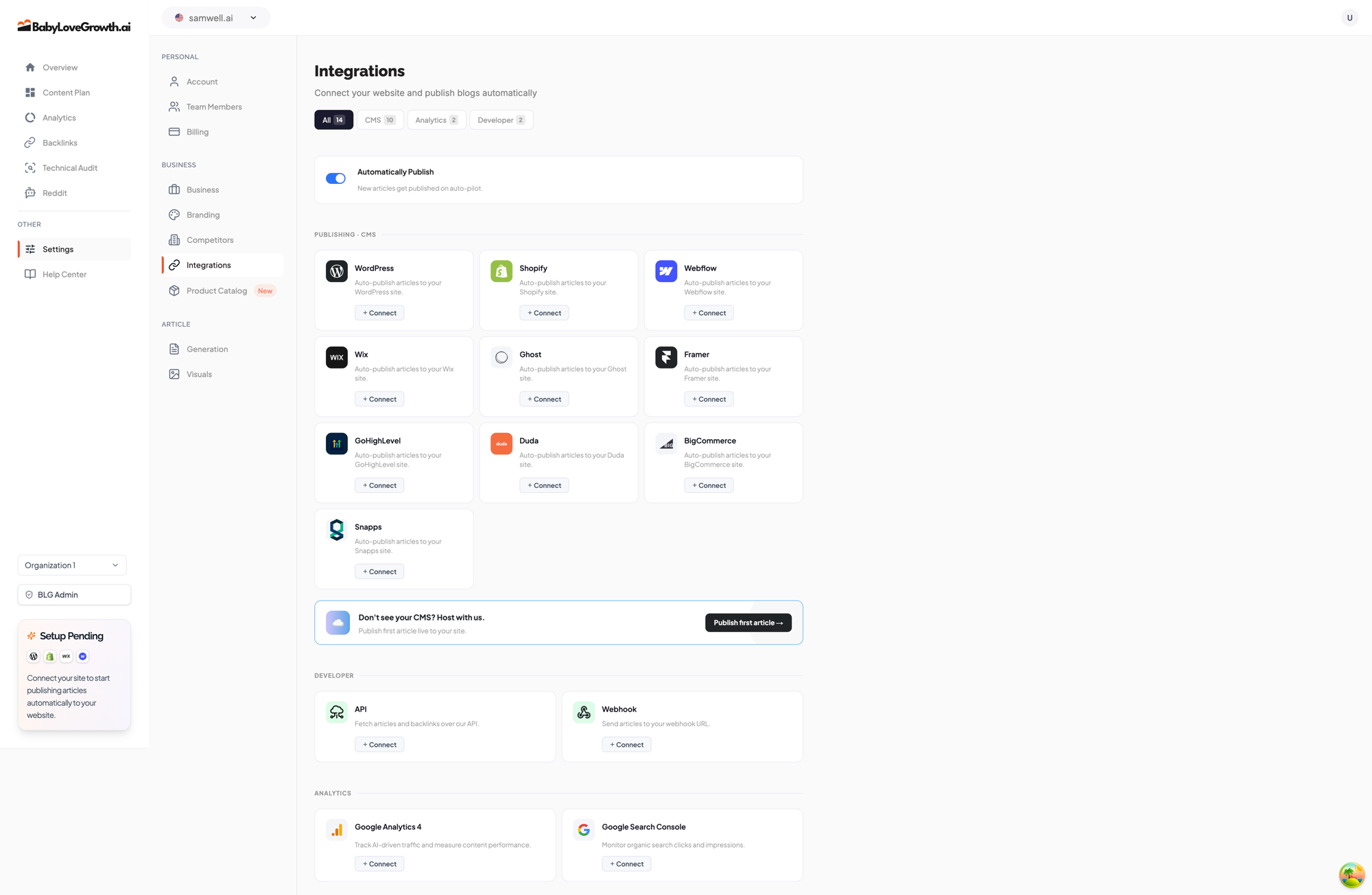
Every connection lives on one screen: Settings → Integrations. The page is built so you can find your platform in seconds:
1
Filter tabs at the top — All, CMS, Analytics, and Developer — narrow the list to the kind of integration you need.
2
Each platform card shows the logo, a short description, and a status pill: Connect when it isn't set up yet, Connected once it's live, or Action needed if something needs your attention.
3
Click Connect to open a step-by-step setup wizard that walks you through the whole connection. After connecting, the button becomes Manage so you can change settings any time.
4
The Automatically Publish toggle near the top controls whether new articles publish to your site on auto-pilot once an integration is live.
Available Integrations
Choose your platform below to get started:
Recommended: Hosted Blog
Publishing & CMS

WordPress
Install our official plugin and auto-publish to your WordPress site.

Shopify
Auto-publish articles to your Shopify store blog with a custom app.

Webflow
Paste one API token and publish straight to your Webflow CMS collection.

Wix
Connect with your Site ID and an API key to auto-publish blog posts.

Ghost
Connect your Ghost site with Admin and Content API keys.

Framer
Use our official Framer plugin to import articles into your CMS.

GoHighLevel
Publish to your GoHighLevel blog with a Private Integration token.

Duda
Import articles into your Duda website using an RSS feed.

BigCommerce
Auto-publish articles to your BigCommerce store blog.

Snapps
Connect with your Snapps API key and Site ID.
Developer

API
Fetch articles programmatically using our REST API.
Webhooks
Receive real-time article notifications via webhook.

Next.js Blog
Render your articles as a blog on your own Next.js site using our npm package.
Analytics
Track how your content performs right from the Analytics tab on the Integrations page. Connect these to see AI-driven traffic and organic search performance inside your dashboard.

Google Analytics 4
Track AI-driven traffic and measure content performance.

Google Search Console
Monitor organic search clicks and impressions.
AI website builders
Building on a no-code or AI website builder? These platforms don't need a dedicated connector — use Blog Hosting to add a blog on your subdomain with a single DNS record.
Don't see your platform?
If your platform isn't listed, you have two easy options:
- Blog Hosting — let us host your blog on
blog.yoursite.comwith a single DNS record. Works with virtually any website or builder. - API or Webhooks — for developers, build a custom connection that fetches or receives articles automatically.
Still stuck? Contact support via the chat icon in the bottom-right corner — we're happy to help.